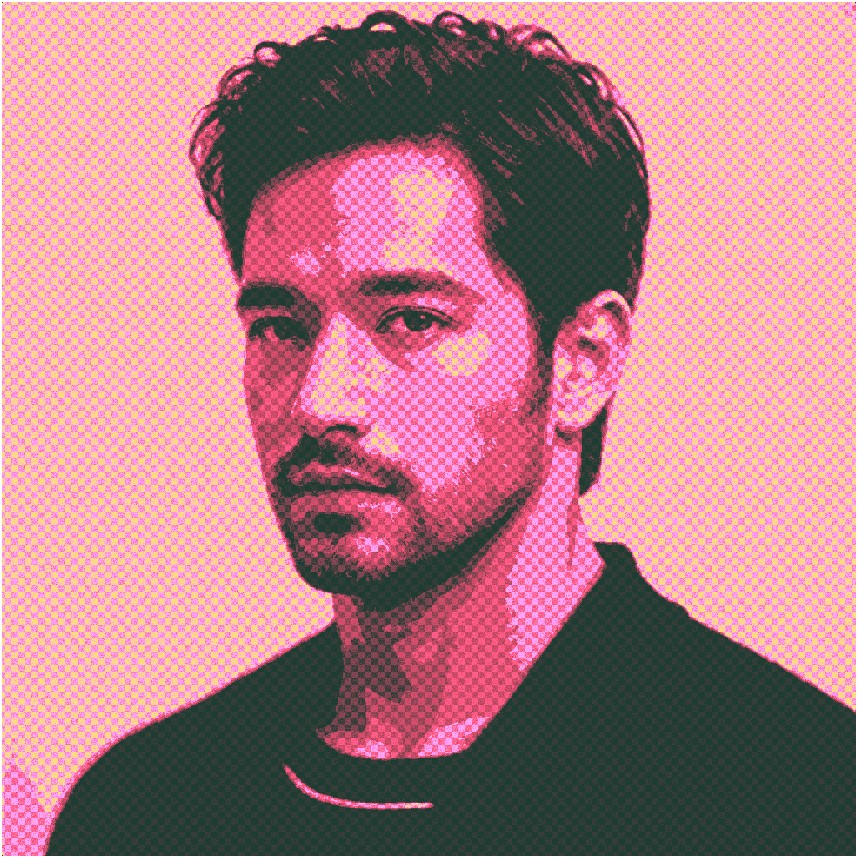
ベンデイドットアート風
画像処理
画像をベンデイドットアート風に加工
MATLABで実装
ソースコード (MATLAB)
%% 元画像の読み込み
% ユーザが画像ファイルを選択
[file, path] = uigetfile({'*.jpg;*.jpeg;*.png;*.bmp', 'Image Files (*.jpg, *.jpeg, *.png, *.bmp)'; '*.*', 'All Files (*.*)'});
fullFilePath = fullfile(path, file);
oriI = imread(fullFilePath);
%figure, imshow(oriI);

%% 指定の大きさにリサイズ
% 固定解像度の設定
        elseif brightness < 135
            reducedI(y, x) = 105;
        elseif brightness < 180
            reducedI(y, x) = 135;
        elseif brightness < 210
            reducedI(y, x) = 180;
        else
            reducedI(y, x) = 210;
        end
    end
end
reducedI = uint8(reducedI);
%figure, imshow(reducedI);

%% ベンデイドット化
I = double(reducedI);
% 画像のサイズを取得
[height, width] = size(I);
% 出力画像を初期化 (モノクロ画像)
noizedI = zeros(height, width);
% 8X8ピクセル単位でノイズを付与
for x = 1:width
    for y = 1:height
        noizedI(y, x) = 80 * rem((int16(x/8)+int16(y/8)), 2);
    end
end
noizedI = uint8(noizedI);
% ガウシアンノイズを付与
noizedI = imnoise(noizedI,"gaussian");
% ベンデイドット風変換
bendeiI = reducedI - 0.5.*noizedI;
%figure, imshow(bendeiI);

%% グラデーションのカラー変換
% 計算のためにダブル型に変換
I = double(bendeiI);
% 画像のサイズを取得
[height, width] = size(I);
% 出力画像を初期化 (カラー画像)
ryI = zeros(height, width, 3);
% ループで各ピクセルの輝度を基にカラー変換
for x = 1:width
    for y = 1:height
        brightness = I(y, x);
        if brightness < 125
            ryI(y, x, 1) = brightness * 9 / 5 + 30;
            ryI(y, x, 2) = brightness * 4 / 25 + 60;
            ryI(y, x, 3) = brightness * 14 / 25 + 50;
        elseif brightness < 165
            ryI(y, x, 1) = 255;
            ryI(y, x, 2) = brightness * 3 / 2 - 215 / 2;
            ryI(y, x, 3) = brightness * 2 - 130;
        elseif brightness < 215
            ryI(y, x, 1) = 255;
            ryI(y, x, 2) = brightness * 9 / 5 - 157;
            ryI(y, x, 3) = brightness * (-4) + 960;
        else
            ryI(y, x, 1) = 255;
            ryI(y, x, 2) = brightness / 2 + 245 / 2;
            ryI(y, x, 3) = 100;
        end
    end
end
ryI = uint8(ryI);
figure, imshow(ryI);
© Haruya Matsushima